BETA VERSION 2.0 · NOW AVAILABLE

From multi-currency books
to IFRS statements in USD.

FX Ledger is a multi-currency accounting web application for small companies operating overseas. It keeps a book for each currency in a head office and branch structure, and produces combined IFRS financial statements in one click. Version 2 adds invoices in their document currency, payment files for Mizuho and MUFG, and automated month-end FX revaluation.

IFRSUSD reportingHead office & branchesIAS 21 remeasurementLNG joint operation (IFRS 11)VAT / GST4-step workflowPayment files (ABA / ISO 20022)Month-end revaluation
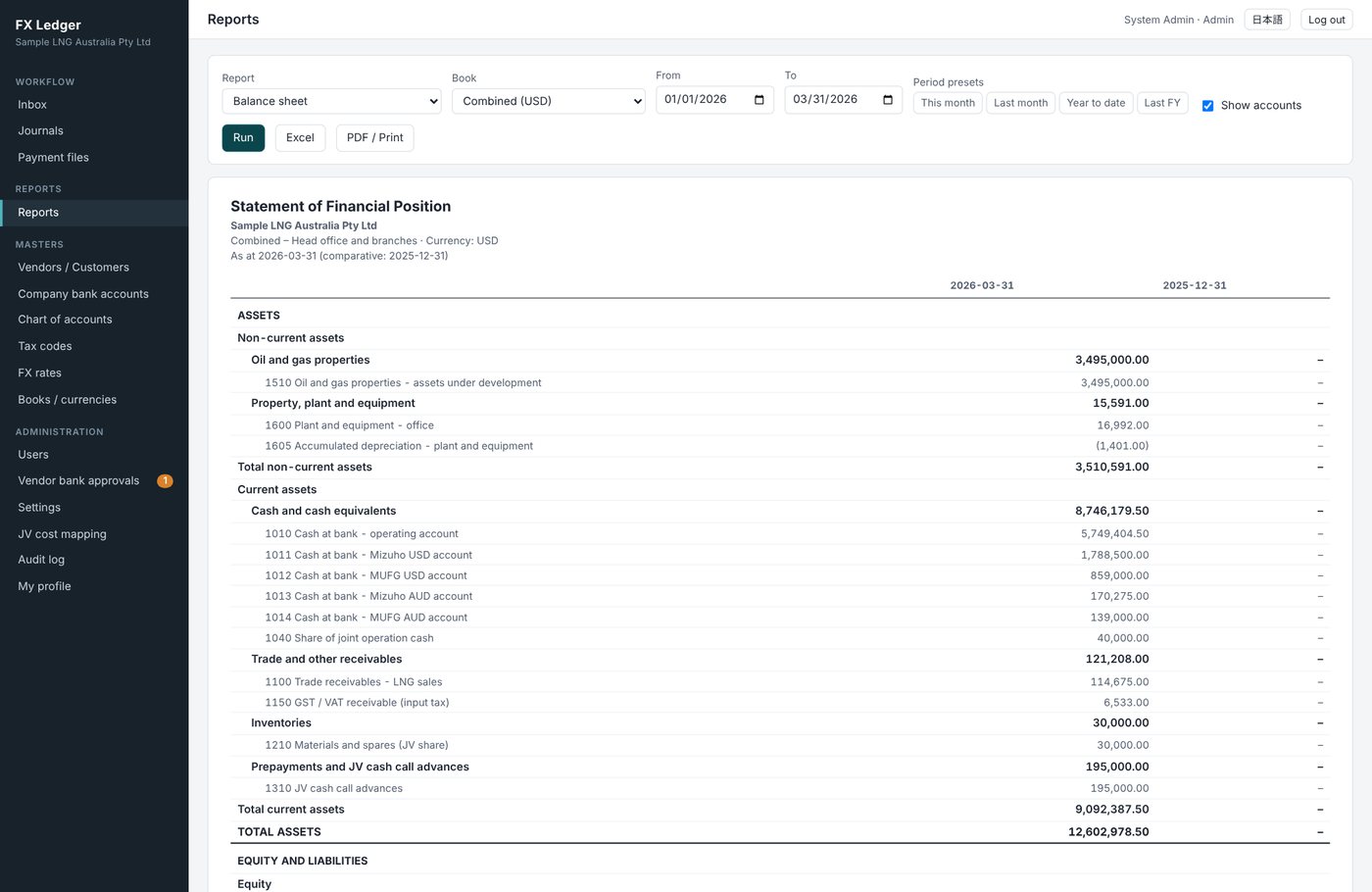
Combined statement of financial position
About

What FX Ledger does

Every transaction is recorded in its own currency, in the book for that currency. At period end – or on any date you choose – branch books are remeasured into US dollars, and the head office and branch accounts are eliminated automatically to produce combined statements.

¤

A book for each currency

Journals, general ledgers and financial statements for the USD head office and for each branch (AUD and more).

⇄

USD remeasurement & combination

Branches are remeasured under IAS 21, differences are posted automatically, and interoffice accounts are eliminated.

◎

LNG joint operation

Cash calls, billing statement imports and distributions – your share is recorded directly in your books.

✓

Approval and audit trail

Initiator → reviewers (0–5) → approver. Journals post only after approval, and every action is logged.

¥

Document currency entry

Enter invoices in their own currency and amount. Book amounts are calculated from the rate, and foreign amounts are kept.

↗

Payment files

At final approval of a payment, the file for Mizuho or MUFG web banking (ABA, pain.001, CSV) is produced.

◐

Month-end revaluation

Foreign currency cash and payables are revalued at the closing rate for each book, and reversed automatically on the 1st.

⚿

Payee bank control

BSB and SWIFT payee accounts in the vendor master; changes take effect only after approval by another admin.
Head office book (HO)USD · presentation / functional Branch 1 (AUD)AUD-denominated book Branch 2 (optional)e.g. JPY · IDR · EUR CombinedUSD · IFRS statements Remeasure into USD (IAS 21)Eliminate HO / branch accounts
Features

Key features

Everything an overseas finance team needs – from daily bookkeeping to the month-end close and group reporting.

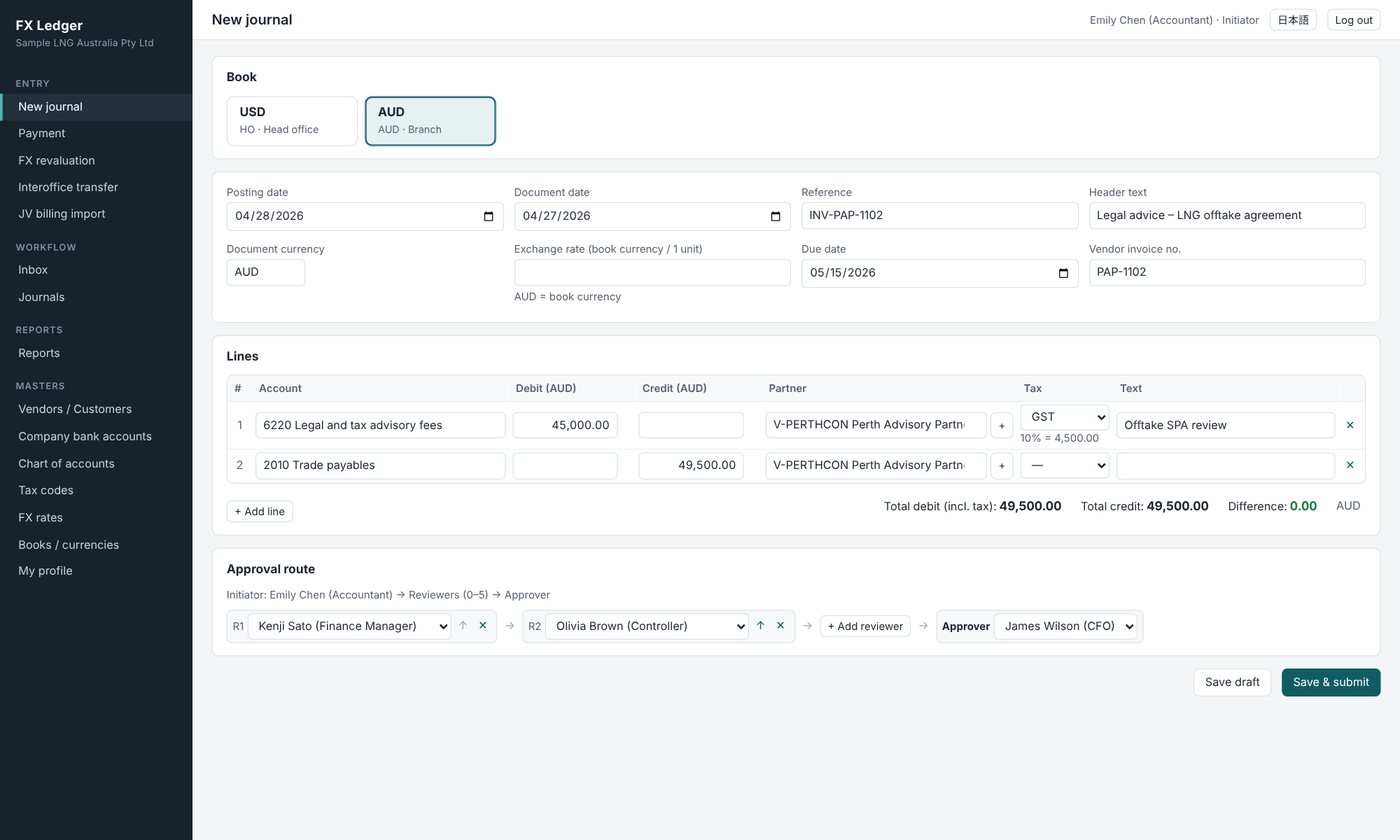
SAP-style journal entry

Choose the book (currency), then enter both the posting date and the document date.

  • Enter the document currency and foreign amounts; book amounts are calculated automatically
  • Select a tax code and the VAT / GST line is created automatically
  • Payables carry a due date and invoice number and stay open until paid
  • Add or edit vendors and customers – kept in one partner master – while you type
  • Attach supporting documents, copy journals, and correct with reversals
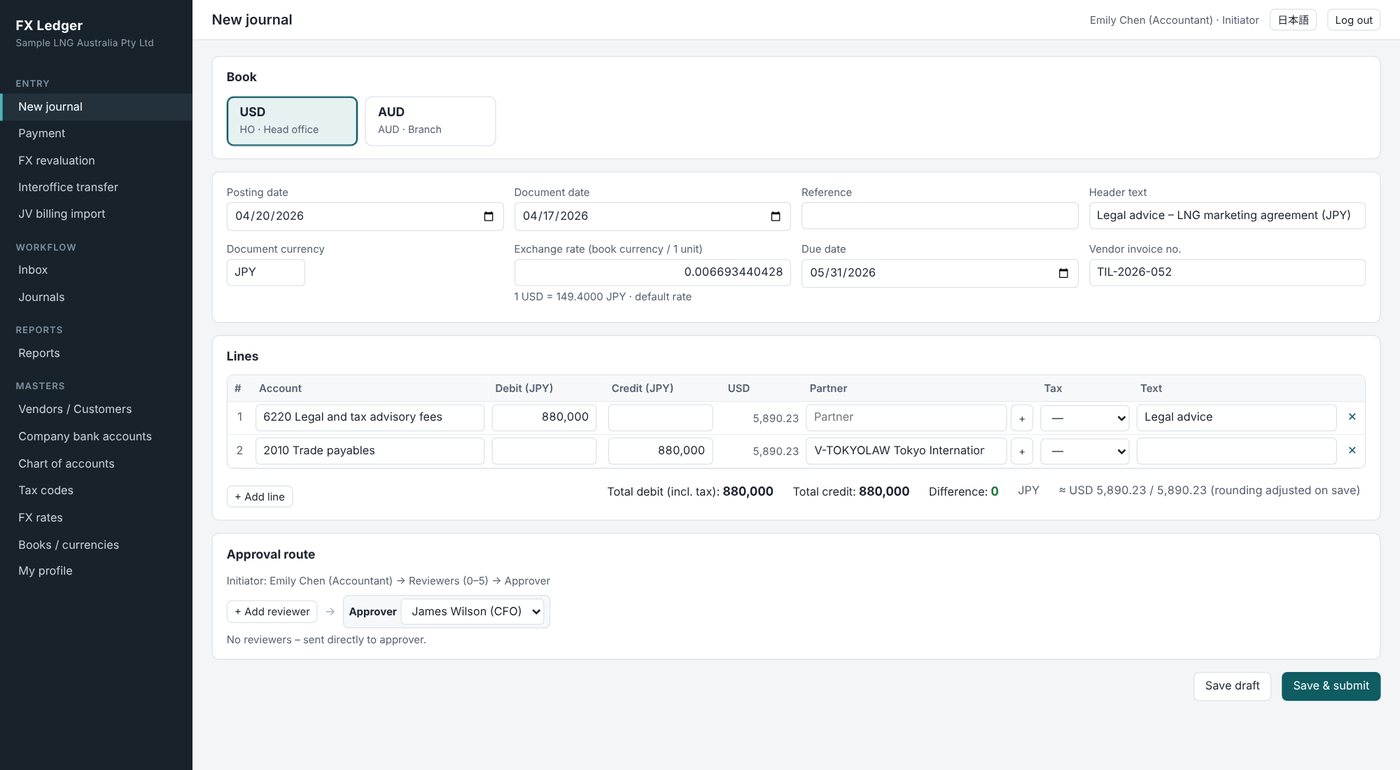
Journal entry screen

Foreign currency invoices in their own currency

Record yen or euro invoices in the USD head office book, or US dollar invoices in the AUD branch book, exactly as invoiced.

  • The daily rate (or monthly average) is filled in automatically, with cross rates via USD
  • Override the rate per journal; rounding is adjusted on save
  • Foreign amounts are kept on every line for revaluation and payment
Foreign currency invoice entry

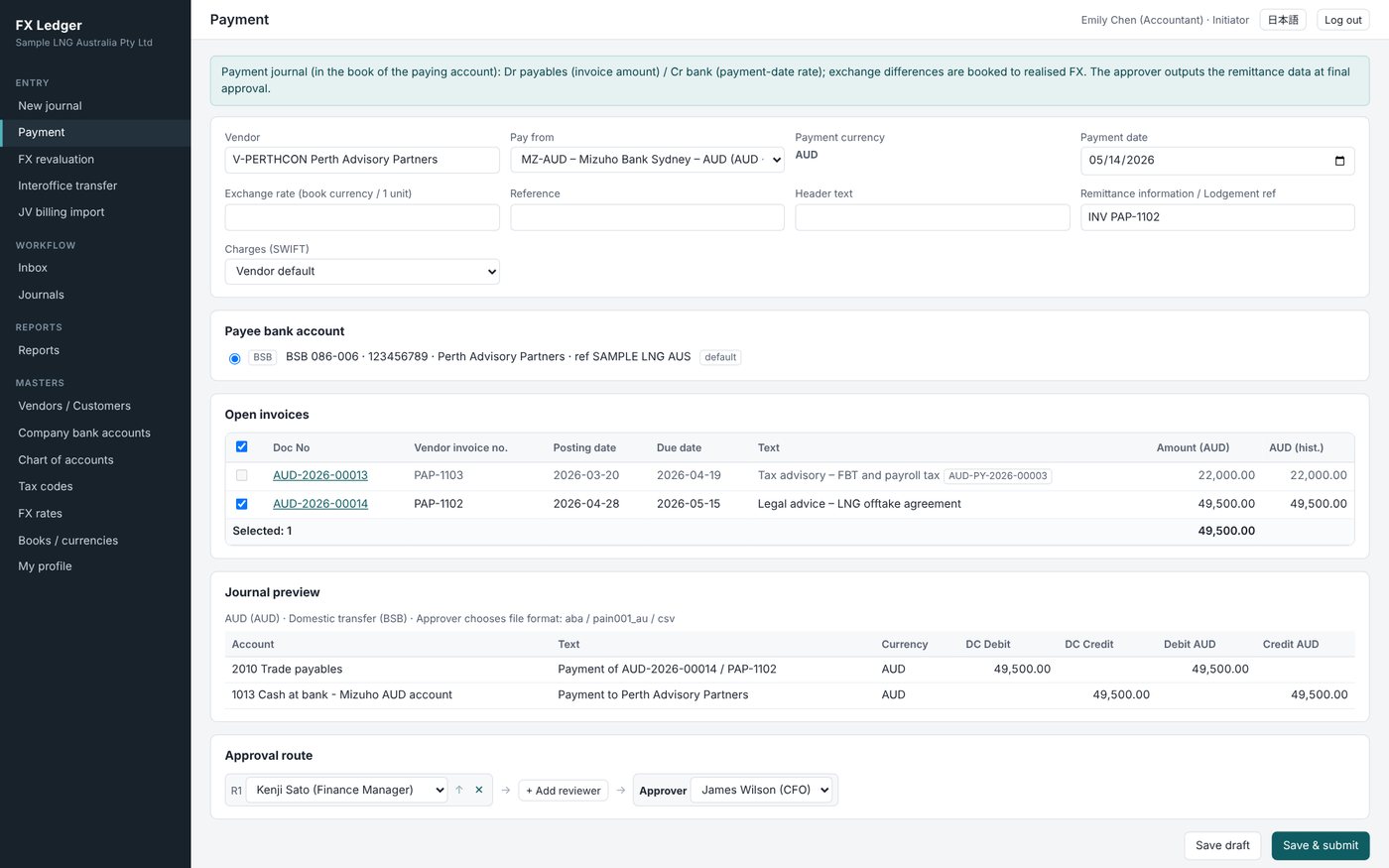
Payments and payment files

Select open invoices to create a payment. At final approval the approver chooses the format and outputs the file for web banking.

  • Pay from the Mizuho and MUFG USD accounts (head office) and AUD accounts (branch 1)
  • Domestic: ABA (Cemtex) / pain.001 (BSB) / CSV; international: pain.001.001.09 / .03 / CSV
  • USD accounts can also pay yen and euro invoices; realised FX is booked automatically
  • Files are stored with the payment and downloads are recorded to prevent paying twice
Payment screen

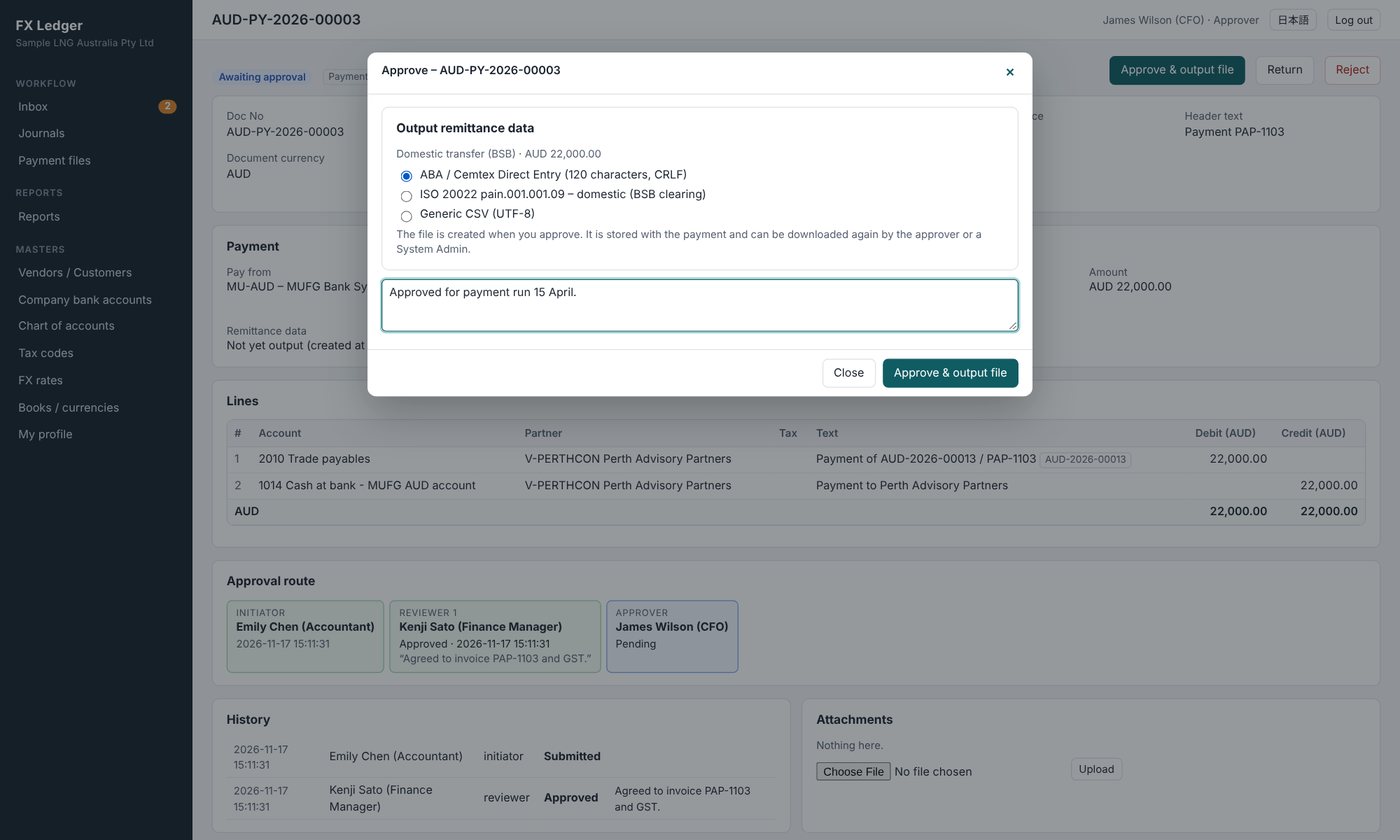
Choose the file format on approval

The approver sees “Approve & output file”. Choose the format your bank’s web banking expects, and the file downloads as the payment is posted and the invoices are cleared.

  • One file per payment journal (no combining)
  • Payee bank details are taken from the vendor master
  • New or changed payee details are approved by a different System Admin
Choosing the payment file format

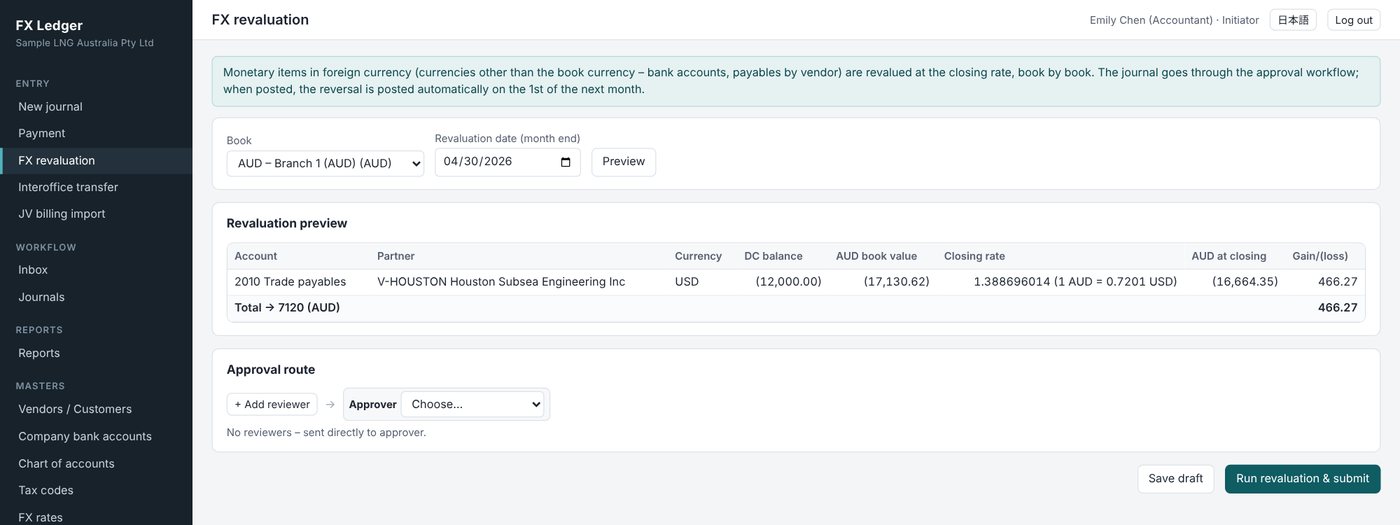
Month-end revaluation of foreign currency items

Foreign currency cash and payables by vendor are revalued at the month-end closing rate, book by book.

  • Preview the gain or loss by account, currency and partner
  • The revaluation is approved through the workflow; duplicates are blocked
  • A reversal dated the 1st of the next month is posted automatically
FX revaluation preview

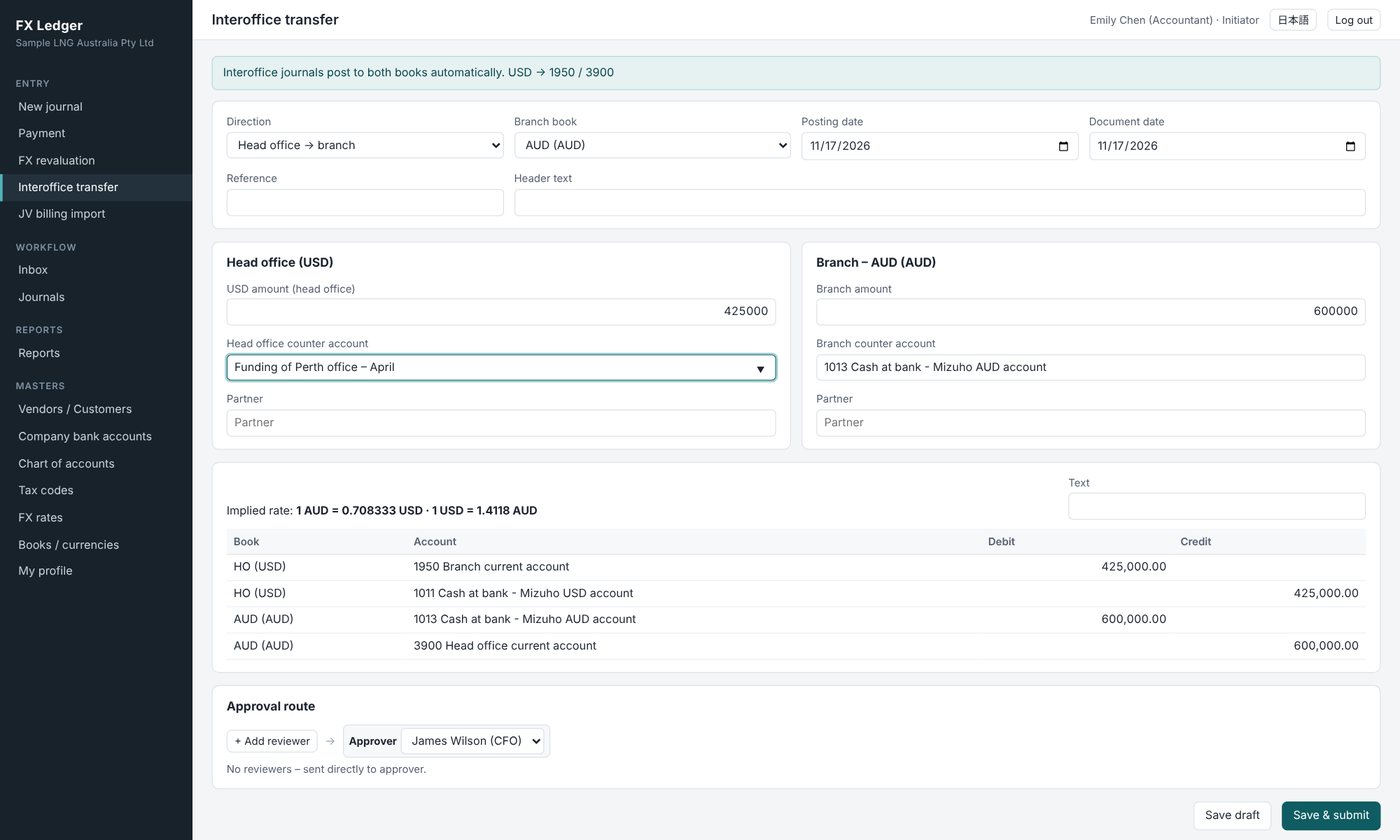
Interoffice transfers in a single document

Enter USD for the head office and the local amount for the branch, and both books are updated at once.

  • The implied exchange rate is shown automatically
  • The head office account is fixed at the USD amount, so it eliminates exactly on combination
  • Also handles expenses paid by the head office on behalf of a branch
Interoffice transfer screen

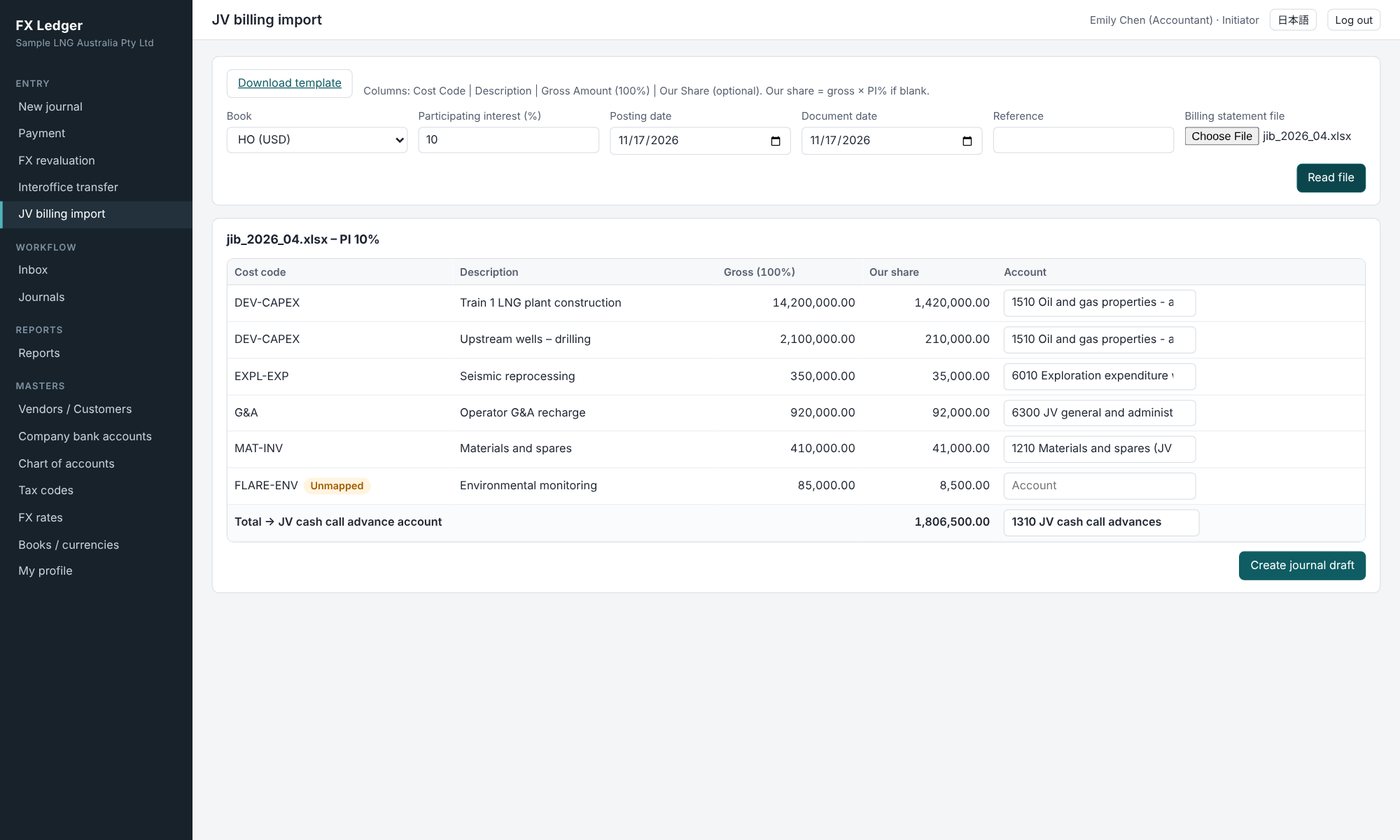
Import JV billing statements

Read the operator’s billing statement (Excel / CSV) and get a draft journal allocated by your participating interest.

  • Cost codes are mapped to accounts automatically (mapping kept in a master)
  • Your share is transferred from the JV cash call advance
  • Supports joint operation accounting under IFRS 11
JV billing import screen

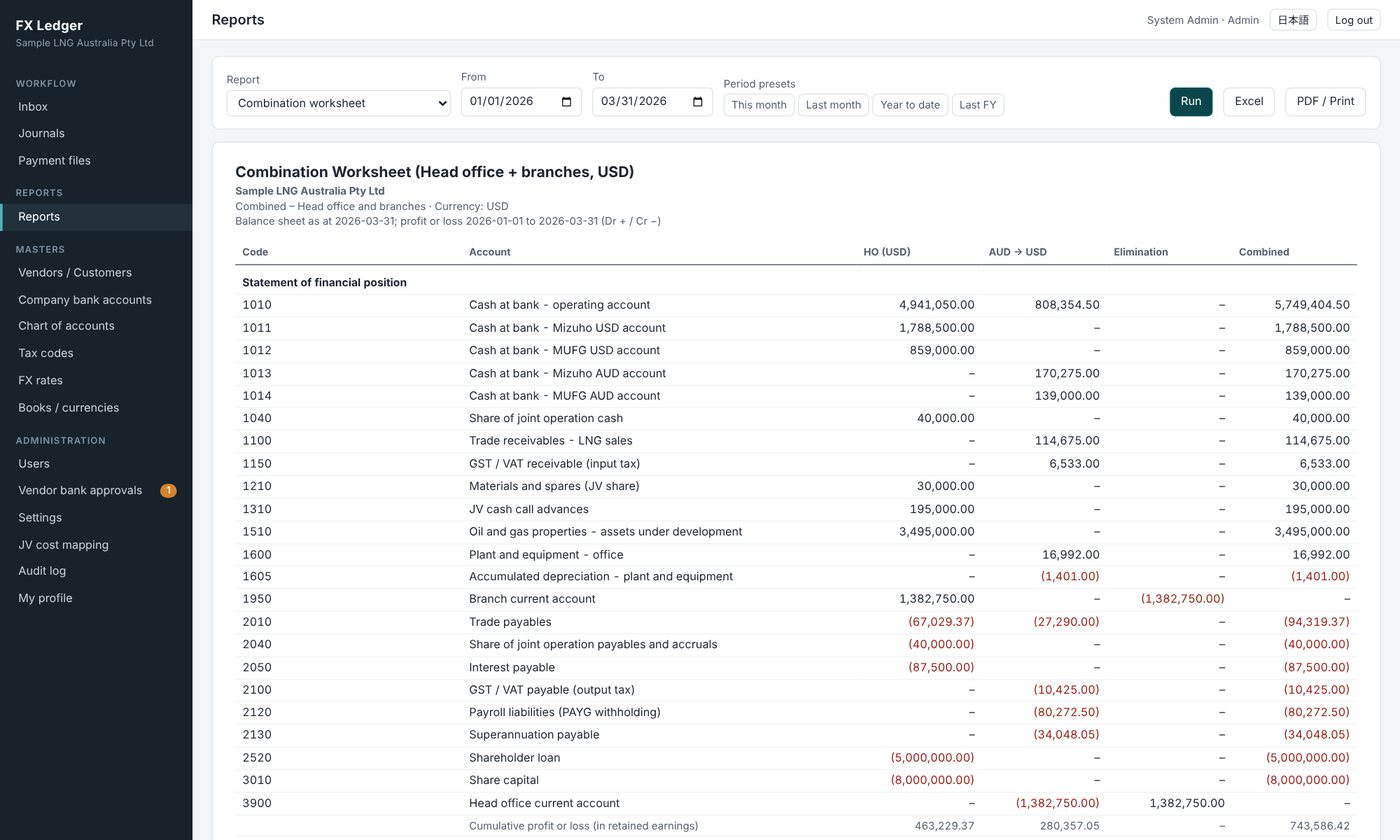
IFRS statements and combination

Statement of financial position, profit or loss and OCI, changes in equity and cash flows (indirect method) – by book, in USD, or combined.

  • Combine on any date, with comparatives to the prior period end
  • Verify eliminations and remeasurement with the combination and remeasurement worksheets
  • Export every report to Excel and PDF
Combination worksheet

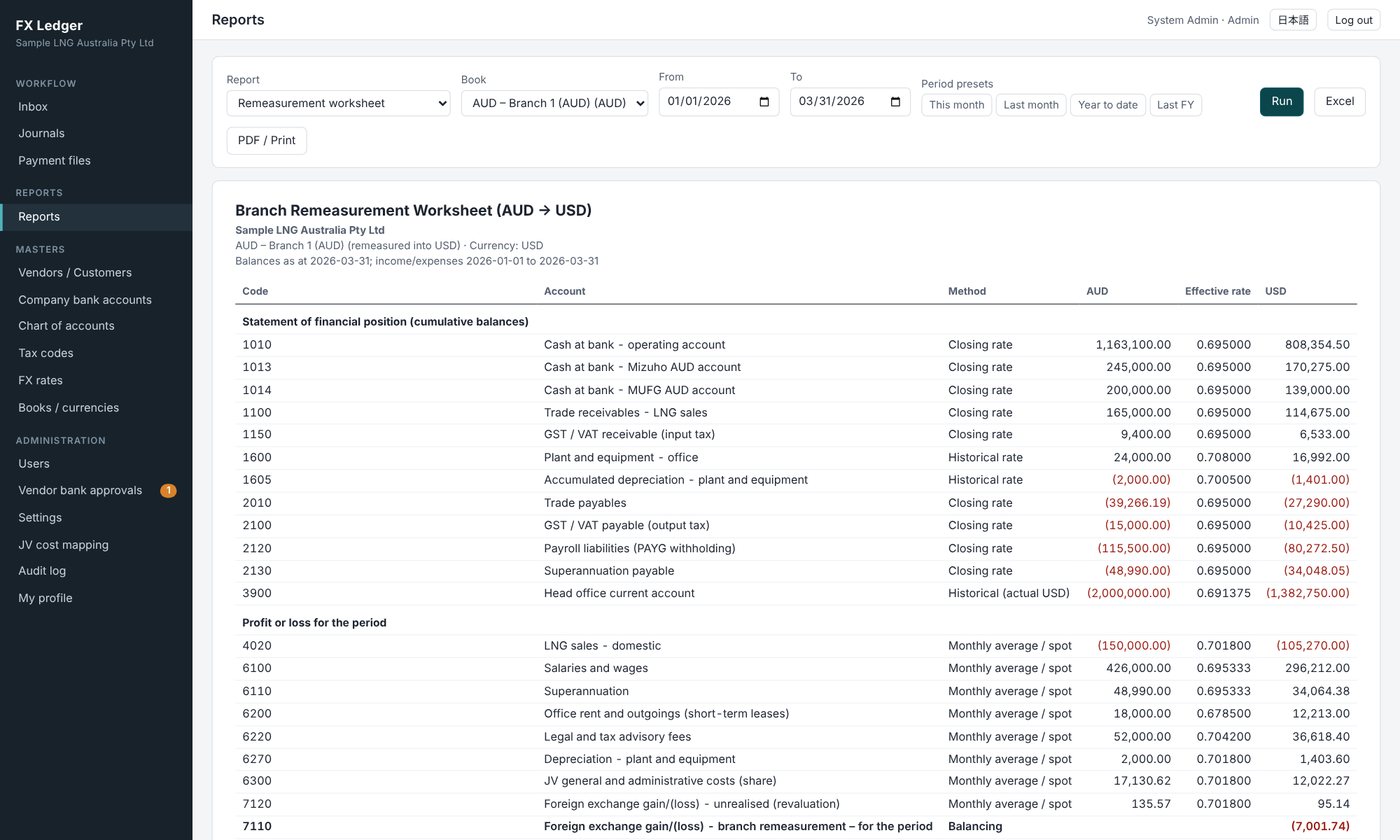
Currency remeasurement under IAS 21

Branch books are remeasured as foreign currency transactions of a USD functional currency company.

  • Monetary items at the closing rate, non-monetary items at historical rates, income and expenses at monthly average rates
  • Remeasurement differences posted automatically to profit or loss
  • Method and effective rate for each account shown on the remeasurement worksheet
Branch remeasurement worksheet
Workflow

Four roles and an approval workflow

Every journal is routed from the initiator to reviewers (0–5, in order) and then to the approver, and is posted to the books on final approval. The route is chosen for each journal from the user master (up to 20 users).

ROLE 1

System Admin

Manages users and roles, masters, FX rates, company bank accounts and the period lock; approves payee bank changes

ROLE 2

Initiator

Creates journals, payments and revaluations, sets the route, responds to returns and creates reversals

ROLE 3

Reviewer

Checks journals and evidence, then approves, returns or rejects

ROLE 4

Approver

Gives final approval – the journal is posted immediately; for payments, the file is output

Initiate→Review ①–⑤→Approve→Posted to books & statements

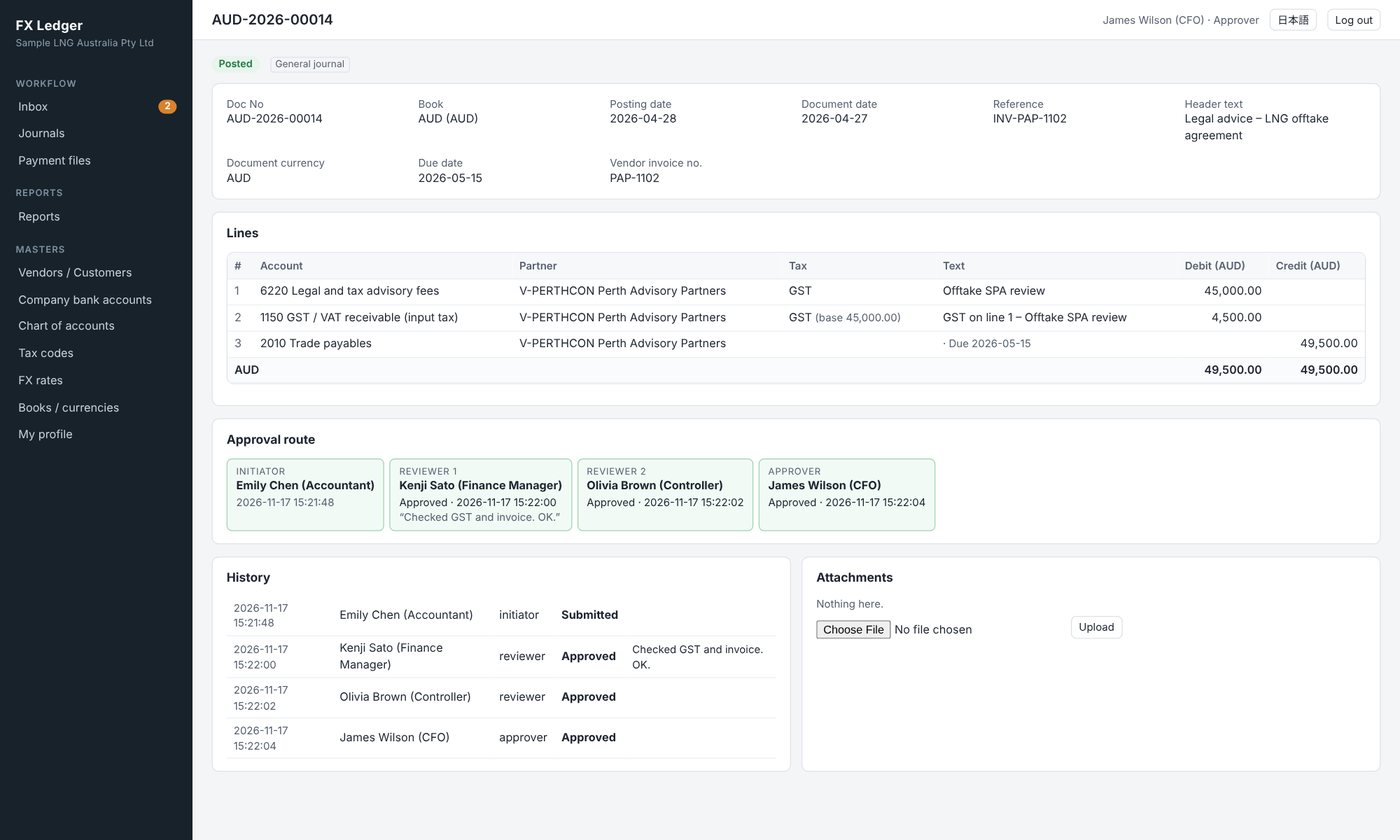
Segregation of duties enforced by the system

  • Initiators cannot review or approve their own journals
  • The approver cannot also be a reviewer of the same journal
  • Comments are required to return or reject, and are kept in the history
  • Journals in a locked period cannot be submitted or approved
Approved journal
Try it

Trial accounts

Use these accounts to log in to the beta system and try it out. Enter a journal as the initiator, then log in again as the reviewer and the approver to follow the whole workflow. The screens can be switched to English after logging in.

RoleUser namePasswordWhat you can try
1. System AdminadminadminashikariUsers, accounts, tax codes, FX rates, books and company bank accounts; payee bank approvals, settings, audit log, all reports, payment file downloads
2. Initiatorinit01Testinitiator1Journal entry (incl. foreign currency), payments, month-end revaluation, interoffice transfers, JV billing import, partners and payee banks, reversals
3. Reviewerrev01Testreviewer1Reviewing journals – approve, return or reject
4. Approverappr01Testapprover1Final approval (posts the journal), approving payments and outputting payment files
Log in to the system

Before you start

  • These trial accounts share one demo environment. What you enter is visible to others and may be changed or deleted without notice.
  • Please do not enter information about real companies, people, transactions or bank accounts. Payment files are demo samples and are never sent to a bank.
  • Please do not change passwords, deactivate users or take other actions that would prevent others from trying the system.
Video

Introduction video: features and operation (about 29 min)

From the concept of the system to initiating, reviewing and approving journals, payments and payment files, month-end revaluation, currency remeasurement, financial statements, administrator settings and the month-end close – with English narration and subtitles.

Downloads

Downloads

Use the feature overview when evaluating the system, and the user guide for day-to-day operation. Japanese editions are available on the Japanese page.

PDF

Feature overview

Accounting premises, book structure, document currency, JV accounting, workflow, payments and payment files, month-end revaluation, remeasurement, reports and security.

A4 · 27 pages · 3.7 MB
Download
PDF

User guide by role

Step-by-step instructions for initiators, reviewers, approvers and system admins, plus payments, payment files, month-end revaluation, report output, a month-end checklist and FAQ.

A4 · 36 pages · 6.4 MB
Download
MP4

Introduction video (about 29 min)

Features and operation explained with English narration and on-screen subtitles (1920×1080). The subtitle file (SRT) is also available.

MP4 · 29 min 21 s · 34.8 MB
Download MP4Subtitles (SRT)
Beta

About the beta

This beta release lets you evaluate the features and usability ahead of the full release. System requirements and current limitations are listed below.

ServerPHP 8.1+, MySQL 5.7+ / MariaDB 10.3+ (runs on standard cPanel hosting)
BrowserLatest Google Chrome, Microsoft Edge, Safari or Firefox
LanguagesJapanese / English screens (per user). Reports are produced in English
UsersUp to 20 workflow users, combining the four roles
SecurityHTTPS, hashed passwords, lock-out after failed log-ins, CSRF protection, audit log

Beta limitations

  • Clearing and collection management for receivables, and e-mail notifications, are planned for a later release.
  • Payment files are not sent to banks automatically – upload them to web banking. Check file specifications against each bank’s latest documentation.
  • Amount-based approver rules and automatic FX rate feeds are not supported.
  • Please verify report figures with test data before using the system for an actual close.